Internet privacy is becoming one of the most talked-about topics right now. At the center of this chat sits one name, and it is TOR.
But what exactly is TOR? Is it a dark corner of the web reserved for hackers and criminals? Or is it a legitimate tool that millions of people use every single day for online protection?
What is TOR?
TOR stands for The Onion Router
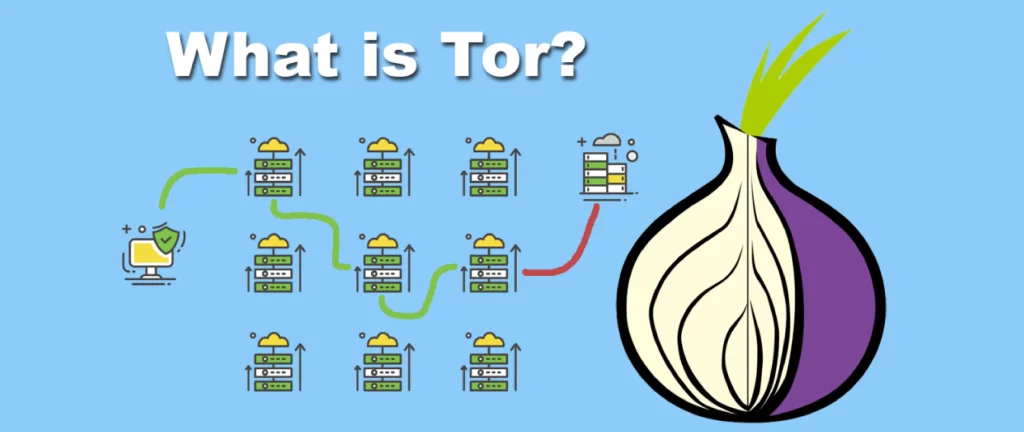
TOR is a free, open-source network. It allows you to browse the internet anonymously. When you use TOR, your internet traffic is directed to a series of volunteer-operated servers, these servers called nodes or relays, placed all around the world.
So, when your request gets to where it’s going, it has gone through so many different places and internet addresses. That’s why finding where it came from and tracing your request back to you is really hard.
For Instance:
It’s like mailing a letter inside multiple envelopes. The first person who gets it only knows how to pass it to the next person. Nobody in this chain sees the full picture. Only the final destination gets the letter with no return address.
A Brief History of TOR
The TOR was not created by hackers or privacy activists. It was developed in the mid-1990s by the United States Naval Research Laboratory. Mathematicians and computer scientists working for the U.S. government were looking for a way to protect military communications and intelligence operations online. So, they want a system where sensitive messages can be tracked.
The result was onion routing. This concept has now become the backbone of what we call TOR.
The TOR project was officially launched in 2002. In 2004, the U.S. Navy released the code under a free license, and the Tor Project, a non-profit organization, was established in 2006 to maintain and develop it further.
Right now, the Tor Project is sponsored by government grants, private donations, and organizations that believe in digital freedom. But the same U.S. government that created TOR continues to fund parts of it.
How Does TOR Actually Work?
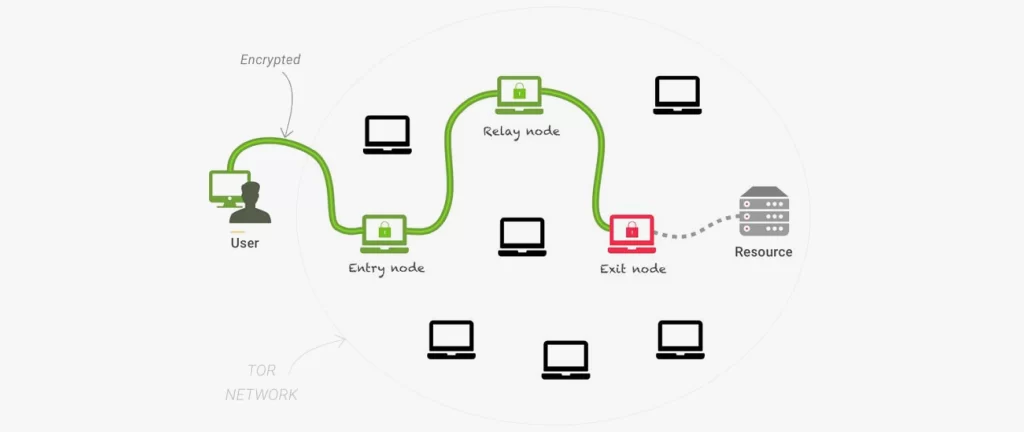
When you connect to the TOR network, your traffic passes through three relays:
Guard Node (Entry Node)
This is the first server your data hits. It knows your real IP address, but it has no idea what website you’re trying to reach.
Middle Node
This relay sits between the entry and exit points. It knows nothing about who you are or where you’re going. It’s essentially a blindfolded middleman.
Exit Node
This is the final relay before your traffic reaches the destination website. It knows the website you’re visiting, but has no idea who originally sent the request.
No single relay ever has the complete picture. That’s the genius of it.
The Layers of Encryption
Right before your data enters the TOR network, it gets covered in three layers of encryption, one for each relay. When your data passes through each node, that node peels off one layer just like peeling an onion. It reads only what it needs to pass it forward, then sends it to the next relay.
When the data exits through the final node, all encryption layers are gone, and the website receives a normal request. But with no connection back to the real user.
This encryption layer system is why the developers selected the name “onion routing.”
About The TOR Browser
Most people access the Tor network using the Tor Browser. It is an improved version of Mozilla Firefox and routes all traffic through the TOR network automatically.
Well, you don’t need to be a tech expert to use it. Here is how simple it is:
- Go to torproject.org
- Download the TOR Browser for your operating system (Windows, Mac, Linux, Android)
- Install and open it
- Click “Connect”
- Browse the internet anonymously
That’s it. Now your real IP address is hidden, your location is concealed, and your browsing activity is encrypted through multiple layers.
Tor Browser also has additional privacy features like blocking trackers, disabling JavaScript by default, and stopping browser plugins that could leak your identity.
Benefits of Using TOR
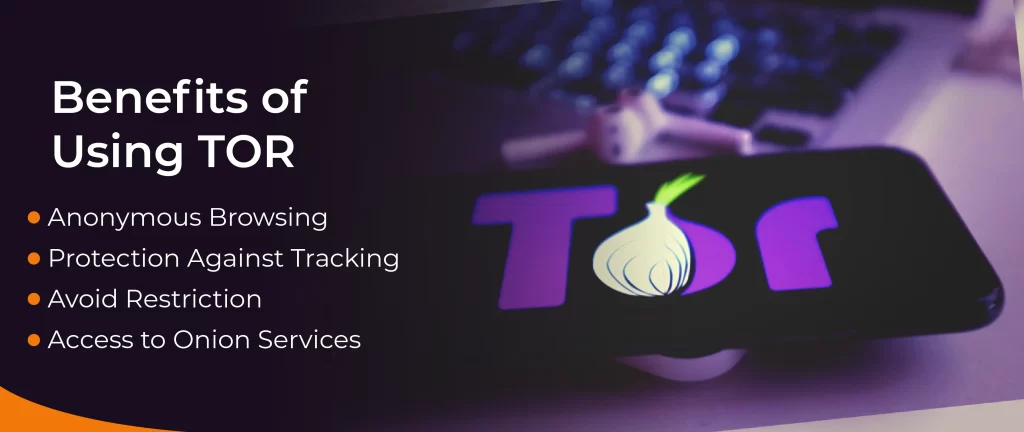
Tor offers you increased privacy and security: here are some benefits of using it.
Anonymous Browsing
Complete anonymous browsing with TOR is almost impossible. But it protects your online activity and stops websites and online services from tracking your real IP address. This makes it much more difficult for anyone to trace and collect data about what you do online. The Tor Browser can also limit the sites that trace your online identity. Third parties can’t use cookies or scripts to track your IP addresses.
Protection Against Tracking
Tor Browser protects your online activity from third-party monitoring. It encrypts and routes your internet traffic through a series of nodes. It will be encrypted even if ISPs, snoops, or hackers interrupt your data. This stops them from accessing your personal data even on public internet networks.
Avoid Restriction
The Tor Browser helps you avoid censorship and access more data. Some governments use restrictions that limit online freedom. However, Tor encrypts web traffic and hides the IP address so you can communicate more freely.
Access to Onion Services
Tor gives you access to onion services that exist within the Tor network. These sites offer end-to-end encryption between the user and the server. Even well-known platforms like the BBC, Facebook, and The New York Times have their own .onion mirrors. It allows people in censored regions to access reliable information freely and safely.
The Dark Web vs. TOR

TOR and the dark web are not the same thing. However, they are very connected.
Well, TOR is a network and a browser.
The dark web is a collection of websites you can only access through TOR (or similar networks). The dark websites use .onion addresses instead of .com or .org domains. Also, they don’t appear in Google searches. That’s why you can’t reach them with a regular browser.
Some dark websites are legitimate, like the BBC and Facebook .onion site. They launched so that people in censored countries can access BBC News and Facebook.
However, the dark web also contains illegal markets, black markets, and dangerous content. But the dark web is a subset of what TOR can access, while not its major purpose.
Using TOR to browse regular websites (like Reddit, YouTube, or Wikipedia) is completely legal in most countries and has nothing to do with the dark web at all.
Is TOR Legal?
Yes, TOR is completely legal in many regions.
In the United States, the UK, most of Europe, Australia, and Canada, downloading and using the TOR Browser is just like using a VPN or privacy tool.
However, TOR is banned or restricted in some countries, including:
- China
- Russia
- Iran
- North Korea
- Belarus
- Turkey
- UAE (United Arab Emirates)
In these countries, using TOR is illegal. People in the areas use TOR bridges. These are private relays that are harder for governments to block.
However, the legitimacy of TOR also depends on what you do with it. If you use TOR to browse anonymously, it is perfectly legal. But if you use TOR for buying drugs or weapons, it is Illegal.
So, the Tor browser does not define your activity. Just like a kitchen knife is legal, but stabbing someone with it is not.
The Limitations and Risks of TOR
TOR is powerful, but it is not perfect. Here’s what it cannot protect you from:
Slow Speeds
TOR is slower than regular browsing because your traffic bounces through multiple relays. For instance, it is difficult to stream video and download large files or data.
Exit Node Exposures
If a website does not use the HTTPS protocol, it can trace the final relay before traffic reaches t the website. A malicious exit node operator can monitor or manipulate traffic.
Human Error
TOR protects your IP address, but it does not protect you from yourself. If you log into your personal Gmail account on TOR, Google knows who you are. If you add your identifying data to an anonymous forum, TOR can see who you are.
Malware and Malicious Sites
The dark web has dangerous sites. TOR won’t protect you from downloading malware or clicking on malicious links. So don’t download unknown files and don’t click suspicious links.
How to Stay Safe When Using TOR
- Download TOR from the official site torproject.org. Fake TOR browsers exist and are loaded with malware.
- Keep the TOR Browser updated, for your security.
- Don’t install extra browser extensions because they can break anonymity and introduce tracking.
- Always use the HTTPS website’s padlock.
- Torrenting can reveal your real IP address and also clog the network for everyone else.
- Don’t log into personal accounts while using TOR.
- Full-screen mode can reveal your screen resolution, which contributes to browser fingerprinting.
- For more security, add TOR with Tails. It is a live operating system designed to leave no trace.
FAQs
Q: Is TOR completely anonymous?
Ans: TOR offers a high level of anonymity, but it is not 100% secure. If you are logging into personal accounts or posting identifying data, it remains the biggest vulnerability.
Q: Can my ISP see that I am using TOR?
Ans: Yes, your ISP can see that you are connected to the TOR network. But they cannot see what websites you are visiting or what data you are sending. If you want to hide that you are using TOR, then use TOR bridges or pluggable transports. It makes TOR traffic look like ordinary HTTPS traffic.
Q: Does TOR protect against viruses and hackers?
Ans: TOR protects your privacy and anonymity. But it is not an antivirus tool. It can block malware, protect you from phishing, or prevent hacking attacks. You still need good antivirus software for that.
Q: Can I use TOR on my phone?
Ans: Yes. The Tor Browser is available on the Android Google Play Store and the official Tor Project website. But if you use an iPhone, use the Onion Browser app, which provides slightly fewer protections than the Android version.
Q: Why is TOR so slow?
Ans: TOR routes your traffic through at least three separate servers in different parts of the world, each one adding to the inactivity. So, the network load and relay capacity are reasons why it is slow. However, speeds have improved over the years, but TOR will always be slower than a direct connection.
Q: What is a .onion address?
Ans: An onion address is a URL only accessible through the TOR network. These are websites hosted on the dark web or by organizations that want to offer a more secure, private version of their service.
For Example: BBC News
Here its official onion URL:
bbcnewsd73hkzno2ini43t4gblxvycyac5aw4gnv7t2rccijh7745uqd.onion
Q: Can I use TOR and a VPN at the same time?
Ans: Yes. To set up TOR over VPN, connect to your VPN first, then open TOR. It hides that you are using TOR from your ISP, and your VPN provider only realizes that you connected to TOR, not what you did inside it. The reverse (VPN over TOR) is more complex and rarely recommended.
Final Thoughts
TOR is one of the internet’s most misunderstood tools. Strip away the Hollywood hacker imagery and what you’re left with is something far more profound — a piece of technology built to protect human freedom.
Whether you’re a journalist in a conflict zone, a student trying to access uncensored information, a researcher studying cybersecurity, or simply someone who believes that what you search for online is your own business, TOR exists for you.
It’s not a magic cloak. It has limitations. It requires some adjustment in how you browse. But in a world where every click is tracked, every search is monetized, and every government has grown hungry for data, TOR remains a remarkable answer to a very important question:
Who gets to know what you do online?
With TOR, the answer can finally be: nobody but you.